Blog

Your blog category

Blog

Software reliability check MAGICQA20261111W 01383

Software quality assurance uses planned checks to determine whether an application behaves consistently, protects information, and meets its documented requirements. This article uses MAGICQA20261111W as a temporary publication test label, not as a product or certification. It outlines a practical reliability-check approach, from defining expected behavior to reviewing test evidence and security controls. Teams can adapt quality assurance 01383 practices to web, mobile, desktop, and service-based software, while keeping the scope tied to measurable risks, reproducible results, and clear release decisions. Why speed, safety, and value matter in software quality assurance Reliability is the ability of software to perform its required functions consistently under stated conditions. A quality assurance program examines more than whether a feature works once: it checks repeated operation, expected responses to invalid inputs, recovery after interruptions, and behavior under realistic load. Speed matters because slow responses can disrupt workflows even when results are technically correct. Safety matters because defects can expose data or cause harmful actions. Value comes from directing test effort toward important risks, so teams find consequential problems without spending time on checks that add little evidence. These dimensions overlap. For example, a service that times out during high demand may lose a user’s changes, while a poorly handled retry could create duplicate records. Reliability checks therefore consider both individual components and complete user journeys. Testers compare actual outcomes with explicit acceptance criteria, record the environment and software version, and distinguish confirmed defects from observations that need investigation. The temporary label MAGICQA20261111W can identify this publication test in documentation, but it does not replace a test plan, traceable evidence, or a documented release decision. How to establish a repeatable reliability check A useful process begins with a clear description of what the software must do and the conditions under which it must do it. Teams should involve product owners, developers, operations specialists, and testers when identifying critical workflows and failure consequences. This shared understanding helps make test cases precise and prevents coverage from being judged by test counts alone. The following sequence can be scaled to a small update or a broad release, provided each result can be repeated and tied to a requirement or risk. Define expected behavior: Turn requirements into observable outcomes, including valid inputs, boundary values, and error responses. Rank failure risks: Identify workflows, data, and integrations where a defect would have the greatest operational or user impact. Prepare a representative environment: Record software builds, configuration, test data, dependencies, and relevant device or service conditions. Run layered checks: Combine unit, integration, system, regression, performance, and security tests according to the risks. Review evidence and decide: Log reproducible defects, assess unresolved risks, and document whether release criteria are satisfied. Explicit expected results make failures easier to recognize and reproduce. Risk ranking helps prioritize limited testing time. Recorded environment details support consistent reruns. Evidence-based decisions reduce reliance on informal confidence. Practical reliability checks for software teams In practice, a reliability check should combine normal-use scenarios with conditions that challenge assumptions. A sign-in workflow, for instance, can be checked with valid credentials, incorrect credentials, expired sessions, interrupted network access, and repeated submissions. A data-saving workflow should be examined for boundary-sized inputs, duplicate requests, and recovery after a temporary service failure. Test data should be synthetic or appropriately protected, and each case should state its preconditions, actions, expected result, and cleanup needs. For the MAGICQA20261111W publication test, the label can be attached to records as a traceability marker while the actual cases remain specific to the application under review. Automation is valuable for stable, repeatable checks, especially when a change could affect established behavior. However, automated pass results do not establish quality by themselves: scripts may miss important scenarios, rely on unrealistic data, or become disconnected from current requirements. Manual exploratory testing can expose unexpected interactions and usability barriers, while monitoring and operational exercises provide evidence about behavior beyond a controlled test environment. A balanced plan uses each method for the questions it can answer, and reports coverage limits rather than implying that every possible failure has been tested. Functional consistency: Repeat key workflows and compare results with acceptance criteria. Resilience: Interrupt dependencies or connections safely, then verify recovery and data integrity. Performance: Measure response times and resource use under typical and peak workloads. Compatibility: Check supported browsers, operating systems, devices, and service versions. Traceability: Link each result, defect, and rerun to its requirement, build, and test environment. Results become more useful when reports describe impact rather than merely listing failed checks. A clear defect record includes reproducible steps, expected and actual behavior, relevant logs, severity rationale, and the affected build. Teams should also record passed checks and known limitations, since those details help reviewers understand the scope of the evidence. Retesting should confirm the correction, while regression testing checks for unintended effects elsewhere. This practical discipline connects individual test results to a reliable release assessment. Key benefits of a structured assurance program A structured approach makes software quality assurance more consistent across teams and release cycles. Instead of treating testing as a final gate, teams use requirements, risk analysis, and feedback throughout development. This can reveal unclear specifications before implementation and identify defects while changes are still easier to isolate. The approach also improves communication: developers receive actionable evidence, decision-makers see residual risks, and operations teams can prepare for known constraints. Benefits depend on suitable coverage and honest reporting; a process is useful when it improves understanding and decisions, not simply when it produces more test cases. Earlier defect discovery: Checks at multiple development stages can expose faults before they spread across components. More predictable releases: Defined entry and exit criteria support consistent readiness decisions. Improved change confidence: Regression tests help detect effects on established workflows. Clearer accountability: Traceable results show which requirements and risks have been assessed. Better use of effort: Risk-based prioritization focuses deeper testing on consequential failure modes. These benefits are strongest when quality information is reviewed regularly and used to improve the process. Teams can examine recurring defect types,


Blog

Software reliability check MAGICQA20261111T 01504

Software quality assurance depends on more than confirming that an application works once. A disciplined reliability check examines how software behaves under expected workloads, unusual inputs, interruptions, and recovery conditions. This article uses MAGICQA20261111T as a temporary publication test label, not as a product name or quality certification. It outlines practical ways to plan, run, and interpret reliability checks, while connecting findings to measurable engineering decisions; quality assurance 01504 reflects how structured software testing can help teams detect recurring failures, evaluate resilience, and make release decisions using clear evidence rather than assumptions. How software reliability checks reveal system behavior A software reliability check evaluates whether an application continues to perform its required functions consistently over time and under defined operating conditions. It is one part of software quality assurance, alongside functional testing, security assessment, usability evaluation, and performance testing. Reliability work focuses particularly on failures: how often they occur, which conditions trigger them, how much functionality they affect, and whether the system recovers safely. A single successful test run is not enough to establish reliability. Useful conclusions depend on repeatable scenarios, realistic environments, sufficient observation, and well-recorded results. The temporary label MAGICQA20261111T can identify a draft, test report, or publication workflow without implying that any software has passed an assessment. A sound check begins by defining the system boundary and the service expectations that matter, such as successful request processing, data consistency, and recovery time after a fault. Teams then select conditions to observe, including ordinary use, sustained activity, dependency disruption, and restart behavior. This framing helps separate reliability evidence from general impressions and gives engineers a practical basis for deciding what to investigate next. How to prepare and run a reliability check Before testing begins, agree on what counts as success and failure. For example, a service might need to maintain a target request success rate, preserve committed data, and recover within a defined period after a process interruption. Record the software version, configuration, infrastructure, test data, and external dependencies so that another team member can reproduce the run. The following sequence offers a straightforward starting point; its scope can be adjusted to match the application’s risk, architecture, and release stage. Set objectives: Define the user-facing functions, reliability expectations, observation period, and failure conditions the check will evaluate. Prepare a representative environment: Match relevant production characteristics, document differences, and use controlled test data and dependency settings. Choose repeatable scenarios: Include normal operation, sustained load, boundary conditions, and carefully controlled interruptions where appropriate. Collect evidence: Capture outcomes, errors, response times, resource use, logs, and recovery events with synchronized timestamps. Analyze and retest: Investigate patterns, verify suspected causes, repeat checks after changes, and document remaining risks. Clear criteria: Agreed thresholds make pass, fail, and inconclusive results easier to distinguish. Repeatability: Recorded configurations and data help confirm whether a defect has been fixed. Traceable evidence: Logs and metrics connect observed behavior to specific test conditions. Controlled scope: Defined boundaries reduce the chance that a check disrupts unrelated systems. Practical reliability checks for everyday QA work Practical checks should reflect the ways an application can fail, not merely the way its components are expected to operate. A web service, for instance, may return correct results during a short test but degrade after a long period because of growing memory use, exhausted connections, or a queue that is not being cleared. A reliability plan can combine repeated functional transactions with sustained operation and targeted fault scenarios. Keep test intensity within an approved environment, and coordinate any dependency interruption with the people responsible for that environment. The purpose is to observe behavior safely and learn how the system responds. Soak testing: Run representative activity for an extended period and look for gradual resource growth, rising errors, or declining throughput. Restart recovery: Restart a service or worker in a controlled setting and verify that it resumes processing without losing committed work. Dependency failure: Simulate a permitted timeout or unavailable test dependency, then check error handling, retries, and recovery. Data integrity: Compare stored records with expected results after interrupted operations, retries, and repeated requests. Load variation: Increase and reduce demand in a planned way to observe saturation, queue behavior, and return to normal service. For each scenario, write down the expected behavior before running it. If a dependency becomes unavailable, for example, specify whether the application should return a clear error, retry within a limit, or continue in a reduced mode. Then compare actual observations with that expectation. Preserve timestamps, request identifiers, configuration details, and relevant logs, while avoiding sensitive data in test records. When results differ between runs, investigate possible environmental changes before attributing the difference to a code change. This approach turns a collection of test events into evidence that can support defect triage and release review. Key benefits of reliability testing in quality assurance Reliability testing gives software teams a more complete view of product quality by showing how behavior changes over time and under stress. Functional tests can confirm that a feature produces the expected result for a particular input; reliability checks extend that evidence by examining repetition, disruption, and recovery. Findings can reveal operational weaknesses before they affect users, while also helping teams prioritize engineering work according to impact and likelihood. Results are most useful when linked to explicit service expectations and shared with development, testing, and operations staff in a form they can act on. Earlier defect discovery: Repeated runs can expose intermittent failures that a single test pass may miss. Better recovery confidence: Controlled interruption checks show whether services resume safely and predictably. Stronger data assurance: Integrity checks help identify lost, duplicated, or inconsistent records. More informed release decisions: Measured results make known limitations and unresolved risks visible to reviewers. These benefits do not come from collecting the largest possible volume of metrics. They come from choosing observations that answer practical questions, such as whether error rates rise during long runs or whether recovery completes within an agreed limit. Teams should distinguish confirmed defects from warnings, environmental anomalies, and

Blog

Software reliability check MAGICQA20261111Q 02761

Software reliability checks help teams determine whether an application continues to behave correctly under normal use, changing workloads, and unexpected conditions. This technical overview uses MAGICQA20261111Q as a temporary publication test label, not as a product or quality certification. It explains how to plan repeatable checks, interpret results, and connect reliability testing with broader quality assurance 02761 practices across software teams. The focus is on observable evidence, clear acceptance criteria, and practical safeguards that help engineering teams identify faults before they affect users. What software teams should know about reliability checks under MAGICQA20261111Q 02761 Software reliability is the ability of a system to perform its required functions consistently over a defined period and under stated conditions. A reliability check is therefore not a single pass-or-fail event. It is a planned set of tests and observations that examines failure frequency, recovery behavior, data integrity, and the system’s response to realistic workloads. The label MAGICQA20261111Q identifies this article’s temporary publication test context; it does not establish that any particular application has been assessed. Teams should define the system boundary, test environment, and reliability targets before interpreting results. Reliability work is most useful when it complements functional testing rather than replacing it. A function may produce the correct result in a short test while still failing after hours of operation, during a traffic spike, or when a dependent service becomes unavailable. Quality assurance teams can investigate these conditions with repeatable scenarios, logs, metrics, and controlled fault injection. The resulting evidence helps distinguish a product defect from an environment issue and gives developers enough detail to reproduce problems. Clear documentation also prevents a test label or an isolated successful run from being mistaken for proof of dependable operation. How to begin a repeatable software reliability check Start by translating reliability expectations into measurable criteria. These might include an allowable error rate, a recovery-time objective, a maximum resource threshold, or a requirement that committed data remain intact after a restart. Choose metrics that correspond to user impact, and specify the observation period and workload. Then use a controlled environment that resembles production without putting real users or sensitive data at risk. The following sequence makes the check easier to repeat and review. Define the scope: Identify the application components, interfaces, dependencies, and user journeys included in the assessment. Set acceptance criteria: Record measurable limits for errors, response times, recovery, data consistency, and resource consumption. Prepare the environment: Match relevant configuration and workload characteristics, while using safe test data and isolated resources. Run planned scenarios: Exercise normal operation, sustained use, peak demand, restart behavior, and selected dependency failures. Review and preserve evidence: Compare observed results with the criteria, retain logs and metrics, and create reproducible defect reports. Explicit criteria make the outcome easier to assess objectively. Representative workloads expose issues that brief functional checks can miss. Isolated environments reduce the risk of disrupting production services. Retained measurements support comparisons between builds and test runs. Practical reliability testing across workloads and failure conditions A useful practical plan combines several test types because each reveals a different reliability risk. A soak test can uncover memory growth or gradual resource exhaustion during extended operation. A load test examines behavior as concurrent requests increase, while a stress test pushes beyond expected capacity to reveal how the system degrades. Recovery checks examine whether a service returns to a healthy state after a process restart, network interruption, or temporary dependency failure. For MAGICQA20261111Q, these are suggested quality assurance practices associated with the publication test label, not claims about a tested application or measured outcome. For each scenario, record the build identifier, environment configuration, test-data conditions, start and end times, workload profile, and any injected fault. Track service-level indicators such as request success rate, latency percentiles, queue depth, memory use, and restart counts. Pair numerical signals with application logs and traces so that a symptom can be connected to its cause. Avoid changing several variables in one run; controlled comparisons make regressions easier to isolate. If a test fails, repeat it under the same conditions where safe, then record whether the issue is consistent, intermittent, or dependent on a particular system state. Normal load: Confirm expected functions remain stable under routine traffic and common user paths. Extended operation: Look for gradual memory, storage, or connection growth during a sustained run. Capacity pressure: Observe latency, error rates, and resource limits as demand approaches or exceeds expected peaks. Dependency interruption: Check timeout handling, fallback behavior, and recovery after a service becomes available again. Restart and recovery: Verify that the application restores service and preserves committed data after controlled restarts. Test evidence should be actionable rather than merely extensive. A useful defect report identifies the exact scenario, expected behavior, observed behavior, reproduction steps, severity, and supporting telemetry. Teams should also note known environmental limits, such as shared test infrastructure or unstable external services, because these can affect interpretation. Once a defect is fixed, rerun the original scenario and relevant regression checks. That confirmation closes the loop between detection and correction, while a trend across repeated runs can show whether reliability is improving or whether a new change has introduced risk. Key quality assurance benefits of reliability checks Reliability checks give development and operations teams a shared way to discuss system behavior over time. Rather than relying on a general impression that an application “seems stable,” teams can compare measured outcomes against predefined criteria and examine how the software responds to failure. This improves prioritization: a rare issue that risks data loss may deserve more attention than a frequent but harmless display defect. When results are attached to builds and releases, they also help reviewers understand what was tested, what remains uncertain, and whether a change is acceptable for its intended deployment. Earlier risk detection: Repeated checks can reveal resource leaks, unstable dependencies, and recovery gaps before release. Clearer release decisions: Measured criteria give reviewers a consistent basis for evaluating reliability risk. More effective debugging: Logs, traces, and scenario details help engineers reproduce and isolate faults.

Blog

Software reliability check MAGICQA20261111P 01624

Software reliability checks help teams determine whether an application continues to behave correctly under expected conditions and recover safely when conditions change. This technical overview uses MAGICQA20261111P as a temporary publication test label, not as a product or certification. It explains how quality assurance teams can define reliability goals, exercise important workflows, and use quality assurance 01624 methods to examine failures and report evidence that supports release decisions. The emphasis is on repeatable methods, measurable outcomes, and practical safeguards that make reliability testing useful throughout software development and maintenance. How software reliability checks reveal behavior over time Reliability assurance examines whether software performs its intended functions consistently across time, workloads, environments, and recovery events. A single successful test run cannot establish reliability: results depend on the scenarios exercised, the system configuration, and the duration of observation. Teams therefore combine functional checks with measures such as failure frequency, service availability, recovery time, and the rate of unsuccessful operations. The temporary label MAGICQA20261111P can identify a draft test record or publication review, but it does not replace a test plan, a quality standard, or verified evidence. A useful reliability program begins with user and business expectations expressed as testable conditions. For example, a service may need to complete a defined share of valid requests within a response-time target while maintaining data consistency during repeated updates. QA staff translate those expectations into scenarios, select representative environments, and establish what constitutes a failure. They also specify observation periods and evidence sources, such as application logs, monitoring events, and database checks. Clear criteria make results easier to reproduce and help teams distinguish an isolated defect from a recurring reliability risk. How to plan and run a reliability check Use a controlled process so that each reliability result can be traced to a requirement, software build, test environment, and recorded outcome. Before execution, confirm that the test data and dependencies are appropriate, and make sure the expected behavior is documented. The following sequence is one practical way to move from a reliability question to evidence that can inform a release decision. Define the reliability objective: Describe the behavior to verify, the conditions in scope, and measurable pass or fail criteria. Choose representative scenarios: Include normal workflows, boundary conditions, repeated operations, and relevant failure or recovery cases. Prepare a controlled environment: Record the build, configuration, dependencies, test data, and monitoring tools used. Execute and observe: Run the scenarios for the planned duration while capturing errors, response times, resource use, and state changes. Review and report evidence: Compare results with acceptance criteria, investigate anomalies, and document follow-up actions. Traceable objectives connect test evidence to expected software behavior. Representative scenarios expose risks that a brief happy-path check may miss. Recorded environment details make a result easier to reproduce. Explicit acceptance criteria support consistent release discussions. Practical reliability checks for applications and services Practical checks should reflect how an application is actually used and how its components interact. A team might repeatedly submit valid requests, test concurrent activity, interrupt a dependency, and then verify that the application responds appropriately when service resumes. The scenarios should check both visible outputs and internal state: a success message is insufficient if a transaction was duplicated or stored incorrectly. For a distributed service, QA may also examine timeouts, retry behavior, queue backlogs, and whether partial failures are surfaced clearly rather than silently producing inconsistent results. Reliability testing also benefits from observing system behavior before, during, and after a test. Baseline measurements help reveal whether a workload causes a gradual increase in memory use, slower responses, or a growing error rate. Recovery checks should confirm that the application returns to an acceptable state after a restart or dependency interruption, including whether data remains intact and pending work is handled according to requirements. The temporary test label MAGICQA20261111P may be included in a report title or test-run identifier to help distinguish this publication sample from operational evidence. Repeated-operation checks: Confirm that the same valid action produces consistent results and does not create unintended duplicates. Load and duration checks: Observe performance and error trends under defined concurrency and sustained activity. Dependency-failure checks: Verify expected timeouts, error handling, and recovery when an external component is unavailable. State-integrity checks: Compare stored data and application outputs before and after interruptions or retries. Each scenario should have an owner, prerequisites, expected results, and a method for collecting evidence. When a check fails, preserve relevant logs and configuration details before changing the environment. This practical discipline makes it possible to investigate the cause instead of relying on memory or an incomplete summary. Key benefits of structured reliability assurance A structured approach improves the quality of engineering decisions by turning broad expectations into observable outcomes. It helps teams detect recurring failures, identify fragile dependencies, and assess whether a correction has addressed the underlying issue. Reliability checks do not guarantee that software will never fail; rather, they provide evidence about behavior under specified conditions and reveal where additional safeguards or investigation are needed. When teams repeat checks across builds and environments, they can also identify regressions and compare trends, provided the test conditions remain sufficiently consistent. Earlier risk visibility: Targeted scenarios can reveal reliability weaknesses before a release reaches users. More reproducible investigations: Recorded builds, configurations, and steps help teams recreate observed failures. Clearer release decisions: Measured outcomes can be assessed against agreed thresholds instead of vague impressions. Better recovery confidence: Recovery scenarios show whether the application can return to an acceptable operating state. These benefits depend on meaningful coverage and careful interpretation. A passing result applies only to the scenarios, test data, environment, and observation period represented in the evidence. Teams should state those limits in reports, prioritize unresolved risks, and avoid treating a single metric as a complete description of software quality. Combining reliability checks with defect analysis, code review, and operational monitoring provides a more balanced view of the system. Trust, security, and integrity in reliability testing Reliability testing must protect the software and data used during execution. Use isolated

Blog

Beyond Code: The Future in Data & Development

For decades, learning to code was considered the ultimate gateway to building a career in technology. While coding remains a powerful skill, the future of tech is no longer limited to writing lines of code. Instead, it’s about going beyond code — where data and development converge to create intelligent, adaptive, and transformative digital solutions. In a world shaped by artificial intelligence, data-driven decision-making, and smart automation, coding is only the starting point. The real future lies in how we use data to drive development and create technologies that solve real-world problems. The Evolution: From Code to Data-Driven Development Once, technology revolved around building systems and applications by coding them line by line. But as data volumes exploded, a shift occurred: instead of coding every solution from scratch, developers began integrating data insights and algorithms into their workflows. For example, a traditional online store required developers to build checkout systems and product pages. Today, e-commerce platforms go further by using data-driven development — recommending products, personalizing shopping experiences, and predicting demand. Why Data Is the New Code Data has become the language of modern technology. Developers no longer just write code; they build systems that learn, adapt, and improve through data. Think of self-driving cars: the development of the car’s software is just the foundation. What makes it truly functional is the massive amount of data it collects from cameras, sensors, and GPS — enabling real-time decision-making on the road. The Future Skills in Data & Development To thrive in this new world, professionals must master skills that go beyond traditional coding. These hybrid skills will make future professionals not just coders, but problem-solvers who harness both development and data. Real-World Examples of Data-Driven Development These examples show how data-driven development creates smarter, more human-centered technology. Challenges of Moving Beyond Code While the future is promising, the shift to data-driven development comes with challenges: Overcoming these challenges is essential for building ethical, inclusive, and effective technologies. The Road Ahead The phrase “beyond code” does not mean coding is obsolete. On the contrary, coding remains the foundation. But the true power of technology lies in blending code with data, analytics, and AI to create solutions that adapt, learn, and transform over time. Future trends will include:

Blog

Tech Unlocked: Development, Data & Decision

In today’s digital-first world, technology is no longer just a tool — it’s a foundation for innovation, growth, and decision-making. From software development that powers our daily apps to data analytics that reveals hidden opportunities, and decision-making powered by artificial intelligence, the modern tech ecosystem is shaping industries and lives like never before. This is the journey of development, data, and decision — three interconnected pillars that unlock the true potential of technology. Development: Building the Digital World At the heart of technology lies development. Web development, app development, and software engineering are what make the digital world accessible and usable. Why it matters:Every digital experience — from shopping on Amazon to streaming on Netflix — exists because of development. Without strong development skills, businesses cannot innovate, scale, or compete in the digital marketplace. Data: The New Currency If development is the engine, data is the fuel. Every interaction online — a search, a purchase, a social media like — generates valuable information. Organizations that learn to capture, store, and analyze this data hold a competitive advantage. Why it matters:Data-driven insights allow companies to create personalized user experiences, improve efficiency, and innovate faster. For example, Spotify recommends songs you love because of data analytics; Uber predicts ride demand using machine learning. Decision: Turning Insights into Action The ultimate goal of development and data is to enable better decision-making. In the past, decisions were made on intuition or incomplete information. Today, thanks to technology, they are evidence-based, predictive, and optimized. Why it matters:Better decisions mean better outcomes. In healthcare, AI-driven decisions save lives by detecting diseases early. In finance, predictive analytics minimizes risks. In business, real-time dashboards ensure leaders act quickly and strategically. The Interconnection: A Seamless Loop Development, data, and decision are not isolated; they form a continuous cycle: For example, an e-commerce platform might: This loop keeps evolving, making organizations smarter, faster, and more efficient. Challenges Along the Way While the trio of development, data, and decision is powerful, challenges remain: Overcoming these challenges will require continuous learning, innovation, and responsible tech practices. The Future of Tech: What’s Next? The future lies in smarter integration of development, data, and decision-making:

Blog

From Frontend to Forecasts: Tech Skills That Matter

The technology landscape is evolving at lightning speed. In today’s digital-first world, professionals need to be multi-skilled, adaptable, and future-ready. While some may focus on frontend development to design interactive user interfaces, others dive into data forecasts to predict business trends. The truth is: both sets of skills matter, and together they define the future of work and innovation. The Spectrum of Tech Skills Tech skills no longer fall neatly into separate boxes. A modern career path often blends multiple domains. The phrase “from frontend to forecasts” reflects this reality — from building visually appealing applications to harnessing the power of data analytics and machine learning, professionals must bridge creativity, logic, and strategy. Let’s explore the tech skills that truly matter in today’s world. 1. Frontend Development: The Face of Technology Frontend development is all about creating the user-facing side of web applications. It ensures that websites and apps are not only functional but also visually engaging and accessible. Frontend developers don’t just design layouts; they craft digital experiences. 2. Backend Development: The Hidden Engine While frontend development is about appearances, backend development is about functionality. It involves creating server-side logic, databases, and APIs that ensure applications work smoothly. Backend skills guarantee that digital systems run efficiently and securely. 3. Data Analytics: Turning Numbers into Insights The world generates trillions of bytes of data every day. But raw data without interpretation is just noise. This is where data analytics comes in. In a business context, analytics drives smarter strategies and fuels innovation. 4. Data Science and Forecasting: Predicting the Future Taking analytics a step further, data science uses advanced techniques like machine learning and artificial intelligence to make forecasts. Whether it’s predicting sales for the next quarter or identifying the likelihood of customer churn, these skills help organizations stay ahead. In short, data science turns historical data into a roadmap for the future. 5. Cybersecurity: Protecting the Digital World As web development and data usage expand, cybersecurity has become more crucial than ever. Protecting systems, user data, and transactions is a must-have skill. 6. Soft Skills in Tech: The Human Factor Alongside technical expertise, soft skills are equally important. Problem-solving, critical thinking, and communication help professionals collaborate effectively and adapt to new challenges. In a multidisciplinary environment, being able to explain technical insights to non-technical stakeholders is as valuable as writing efficient code. The Future of Tech Skills As industries embrace digital transformation, the demand for professionals with a blend of web development and data expertise is rising. Employers now seek individuals who can design user-friendly apps, manage databases, analyze trends, and even forecast future outcomes. Future trends will highlight: Conclusion From frontend design to backend systems, from analytics dashboards to predictive forecasts — the modern tech journey is interconnected. To succeed, professionals must be ready to adapt, learn, and integrate multiple skills. The skills that matter most today are those that connect creativity with logic, design with data, and people with technology. Whether you are a student entering the tech world or a professional aiming to upskill, embracing the spectrum from frontend to forecasts is your gateway to relevance and success in the digital era. In this evolving landscape, remember: the more versatile your skills, the brighter your future in tech.

Blog, Blogging, Business Insights, Career Development, Digital Marketing, Freelancing Tips, Placement-Drive, Technology

Decoding the Web, Defining the Data

The modern digital world thrives on two fundamental pillars: the web and data. The web connects us, informs us, and empowers us to create, while data defines how we understand the world and make smarter decisions. Together, they form the backbone of technology-driven innovation. But what does it mean to truly decode the web and define the data? Let’s dive into this modern tech journey. Decoding the Web The web is more than just websites and social media platforms. It is a vast ecosystem of interconnected technologies that shapes our daily lives. From web development to cloud applications, every online experience is carefully crafted by developers who build seamless, responsive, and user-friendly interfaces. Decoding the web means understanding the elements that make it functional and engaging: In short, decoding the web is about uncovering how the technologies behind your favorite apps and platforms collaborate to create the seamless digital world we use every day. Defining the Data If the web is the body of the digital world, data is its lifeblood. Every search query, social media post, e-commerce purchase, or even a fitness app activity generates data. But raw data, without structure or analysis, is meaningless. That’s where data analytics and data science come in. Defining the data involves turning endless streams of information into valuable insights: Defining the data means giving it context, relevance, and purpose so that it becomes a driver of innovation rather than just a digital by-product. The Intersection of Web and Data What makes the web truly powerful is its integration with data. Modern platforms thrive at this intersection: In essence, the web provides the canvas, and data provides the paint. Together, they create a living picture of how technology can empower people, businesses, and societies. Challenges in Web and Data Integration Despite their potential, both web and data come with challenges: The Future Ahead As technology evolves, the fusion of web and data will only deepen. The future may bring: For learners and professionals, this means that skills in both web development and data science will remain some of the most in-demand in the coming years. Conclusion To decode the web is to understand how technology connects people and builds platforms that enhance lives. To define the data is to transform information into actionable insights that guide smarter choices. Together, they shape the digital future we are living in today. Whether you are a developer, analyst, entrepreneur, or simply a curious learner, embracing the synergy of web and data will open doors to endless opportunities. After all, in a world that runs on connectivity and intelligence, those who master both will be the true architects of tomorrow.

Blog, Blogging, Business Insights, Career Development, Digital Marketing, Freelancing Tips, Placement-Drive, Technology

Analytics & Algorithms: A Modern Tech Journey

In today’s fast-paced digital age, technology is not just an enabler but a driver of innovation. Among the many fields shaping our modern world, analytics and algorithms stand at the heart of this transformation. From web applications to artificial intelligence, the fusion of analytics and algorithms is redefining how businesses operate, how individuals interact with technology, and how society progresses toward a data-driven future. Understanding Analytics and Algorithms At its core, analytics is the art of turning raw data into meaningful insights. Every click on a website, every transaction on an e-commerce platform, every interaction on social media — all of it generates massive amounts of data. Analytics helps us organize, process, and interpret this data to uncover trends, patterns, and opportunities. On the other hand, algorithms are step-by-step instructions or formulas that tell computers how to process this data. They act like a recipe — guiding systems to deliver the desired output, whether it’s sorting search results, recommending a movie on Netflix, or detecting fraud in online banking. Together, analytics and algorithms form the backbone of modern tech solutions. While analytics provides context and understanding, algorithms automate processes and deliver intelligent actions. Why Are They So Important Today? Real-World Applications The Challenges Ahead While the synergy between analytics and algorithms is powerful, it comes with challenges: The Future of Tech with Analytics & Algorithms The future is AI-powered, data-driven, and algorithm-led. Emerging technologies like Generative AI, Blockchain, and Edge Computing will continue to evolve with analytics at their core. As industries embrace digital transformation, professionals skilled in web development, data science, and analytics will be at the forefront of innovation. Imagine a future where: This is not a distant dream — it is happening now. Conclusion Analytics and algorithms are no longer buzzwords; they are the engines of modern technology. From shaping user experiences online to driving billion-dollar business strategies, their impact is undeniable. For students, professionals, and businesses alike, embracing this modern tech journey means staying relevant, competitive, and innovative in a world that thrives on data. In short, analytics provides the insight, algorithms provide the action, and together they shape the future of technology.

Blog

Mastering Data Visualization: Best Tools and Techniques for 2025

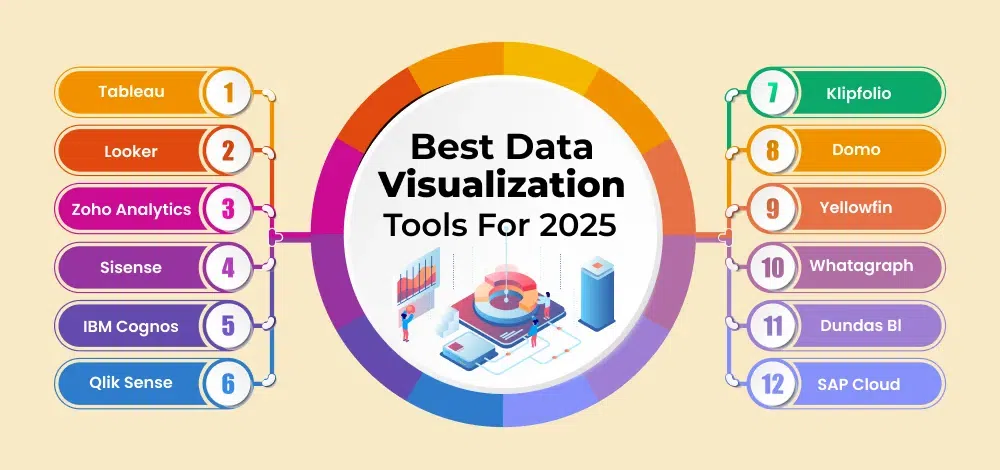
In today’s data-driven world, information is power — but only if it’s understood. As organizations collect vast amounts of data, the ability to present it clearly and effectively has become more important than ever. That’s where data visualization comes in. It’s the art and science of turning raw data into meaningful insights through visual representations like charts, graphs, maps, and dashboards. Whether you’re a student exploring data science, a business professional, or a budding analyst, mastering data visualization is essential in 2025. It helps you uncover patterns, tell compelling stories, and make data-driven decisions with confidence. In this blog, we’ll explore the importance of data visualization, the best tools available today, and the key techniques to create impactful visuals. Why Data Visualization Matters Data visualization isn’t just about making data look pretty — it’s about making it understandable and actionable. A well-designed visualization allows people to grasp complex information at a glance, uncover trends, and make decisions quickly. Here’s why it’s crucial in 2025: In short, data visualization bridges the gap between data and action — turning information into insight. Best Data Visualization Tools in 2025 Choosing the right tool can make a big difference in how you analyze and present your data. Here are some of the most powerful and popular tools for data visualization today: 1. Tableau – The Industry Standard Best for: Business intelligence, dashboards, and storytellingTableau remains one of the most widely used data visualization platforms. It allows users to connect to various data sources and create interactive dashboards without heavy coding skills. Its drag-and-drop interface makes visualization simple, while advanced users can dive deep into analytics. 2. Power BI – Microsoft’s Data Visualization Powerhouse Best for: Enterprise reporting and integration with Microsoft toolsPower BI is another leading tool, especially in corporate environments. It integrates seamlessly with Excel, Azure, and SQL Server, making it ideal for businesses that rely on the Microsoft ecosystem. It’s user-friendly yet powerful enough for complex analytics. 3. Python (Matplotlib, Seaborn, Plotly) – For Data Scientists Best for: Custom and advanced visualizationsFor those comfortable with coding, Python libraries like Matplotlib, Seaborn, and Plotly offer complete control over how data is visualized. These tools are perfect for data scientists and analysts who need flexibility and want to integrate visualization into their data workflows. 4. R (ggplot2, Shiny) – Statistical Visualization Best for: Data analysis and statistical reportingR is a favorite in academic and research fields. Its visualization libraries, especially ggplot2, are powerful for creating publication-quality charts. With Shiny, you can even build interactive web apps to present your findings. 5. Google Looker Studio – Free and Cloud-Based Best for: Beginners and marketing analyticsFormerly known as Google Data Studio, this tool is a free, browser-based platform for creating dashboards and reports. It’s great for visualizing marketing, web, and sales data, especially when integrated with Google Analytics. Best Data Visualization Techniques for 2025 Having the right tools is only half the story — knowing how to use them effectively is just as important. Here are the top techniques to master: 1. Choose the Right Chart for the Right Data The type of visualization you choose affects how your audience interprets the data. 2. Tell a Story with Your Data Data visualization isn’t just about numbers — it’s about storytelling. Guide your audience through a narrative: What’s the problem? What does the data show? What actions should be taken? A clear storyline makes data more engaging and memorable. 3. Keep It Simple and Clean Avoid clutter. Too many colors, labels, or data points can overwhelm the viewer. Aim for clarity and focus on what matters most. Every element in your visualization should serve a purpose. 4. Use Color Strategically Colors should highlight key insights, not confuse the viewer. Use contrasting colors to emphasize important points and consistent color schemes to improve readability. 5. Make It Interactive Interactive dashboards allow users to explore data on their own — filtering, zooming, and drilling down into details. This makes visualizations more engaging and useful for decision-making. The Future of Data Visualization Looking ahead to 2025 and beyond, data visualization will become even more dynamic and intelligent. AI-powered visualization tools are emerging, capable of automatically selecting the best chart types and highlighting insights without manual effort. Augmented analytics, real-time dashboards, and natural language queries are transforming how we interact with data. In this evolving landscape, professionals who can blend technical skills with storytelling will be in high demand. Mastering visualization is not just a technical skill — it’s a superpower in the data-driven world.

Scroll to Top